Like with all new technology and tools, there is an art that goes with the science. Working with DALL-E is no different. If you’re not familiar with DALL-E. It is an image generation generative AI model created by OpenAI. It was first launched in January 2021, with the latest release being its third iteration.
There have been a lot of changes between DALL-E – 2 and DALL-E – 3 Features like SD vs HD images and different sizing options. “One of the new feature in the latest DALL·E-3 API is prompt rewriting, where we use GPT-4 to optimize all of your prompts before they’re passed to DALL-E. In our research, we’ve seen that using very detailed prompts give significantly better results.”
The model generates images based on natural language inputs known as prompts. Namely, given a few short phrases, the model comprehends the language and creates accurate pictures representative of the description it was given. DALL-E – 3 marketing claims: “Modern text-to-image systems have a tendency to ignore words or descriptions, forcing users to learn prompt engineering. DALL-E – 3 represents a leap forward in our ability to generate images that exactly adhere to the text you provide.”
So let’s delve a little deeper into this starting with some of the drawbacks.
DALL-E != Designer
DALL-E can not replace a good Designer. You have to get good with your prompts but even then there are no guarantees to get what you want. There is no intuition to the output that you get when you build a relationship. DALL-E doesn’t understand me when I say, you get the gist of what I need, right? I asked for an image of women in tech. I need those throughout the blog. The image it gave me was…well…. “Special.”

Refresh Prompt
I found subsequent prompts for refinement tend to get worse over time. Partially this was my irritation factor rising but I also realized that with subsequent prompt, in some cases I was making the artistic element of the project more restrictive. However with just a simple request like Create an image: I <heart> DALL-E. The results was a mixed case Dall-e and random filler text at the bottom.
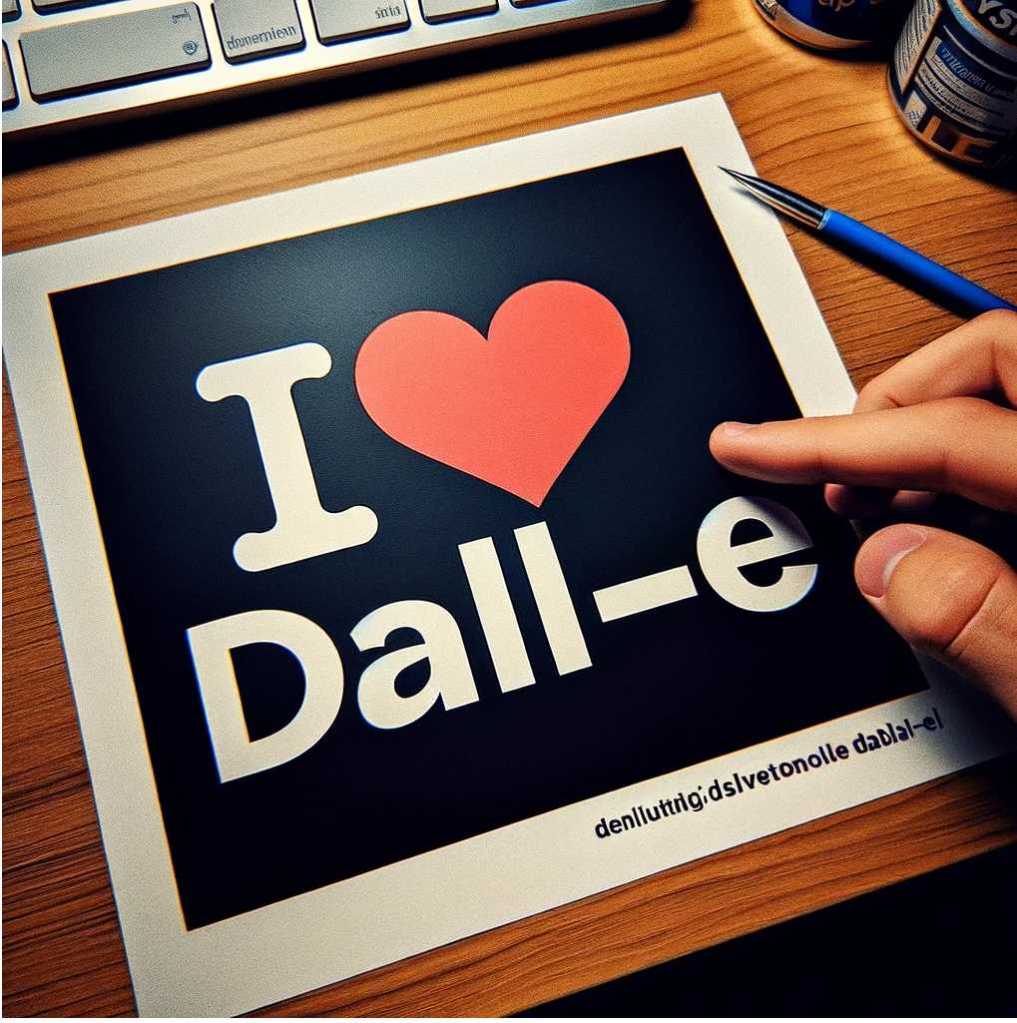
I asked for a regeneration. This time it was in all caps but missing one of the “L”

Next, I tried to switch the prompt to Create an image: I <heart> DALL-E. Use all capitals for DALL-E and spell exactly as specified. I gave up after this.

Now for the things I love about DALL-E
Sometimes it will surprise me. I wanted to build a header image for my post on Women’s History Month. I gave it the names of the three women I wanted to include along with a snippet of other information. The image it created was spot on. I gave it the creative space and freedom to give me a loose idea.
Create a combined image of Grace Hopper, Katherine Johnson, Hedy Lamarr. Image will be used as a header image on a blog post for Women's History Month
Ask and you shall receive
When I asked ChatGPT4 how to better work with DALL-E, it gave me great suggestions.
Creating effective prompts for DALL-E or any other AI image generation tool involves clarity, specificity, and sometimes creativity. Here are some tips for fine-tuning your prompts to get more precise images:
- Be Specific: Clearly specify the elements you want in your image. Include details about the subject, style, composition, and any other important factors.
- Use Descriptive Language: Instead of being too brief or vague, use descriptive language that paints a picture of what you want to see.
- Control the Composition: If you have a specific layout in mind, describe where each element should be placed within the image.
- Limit Elements: The more elements you request in a single image, the more likely it is that some may not be rendered correctly. Focus on a few key elements.
- Request Styles Explicitly: If you’re looking for an image in the style of a certain artist or art movement, mention that specifically.
- Avoid Ambiguity: Ambiguous terms can be interpreted in many ways by the AI. Be as precise as possible to minimize misunderstandings.
- Sequential Detailing: Start with a broad description and then add details sequentially. This helps the AI understand the primary focus before adding complexity.
- Use Analogies: If you’re struggling to describe what you want, use analogies or comparisons to things that are commonly understood.
- Learn From Past Outputs: Review what DALL-E creates from your prompts and refine the language based on what was and wasn’t effectively rendered.
- Keywords Matter: Identify and use keywords that directly relate to the concept or theme you are aiming for.
- Prompt Length: While being descriptive is good, too long a prompt can confuse the model. Keep it to a necessary length.
- Avoid Contradictions: Make sure your prompt doesn’t contain conflicting instructions, which can lead to confusing outputs.
Like all technology, sometimes it’s practice and other times a good review by peers. Are you having luck with DALL-E and want to give some pointers in the comments?
Resources:
OpenAI Cookbooks: https://cookbook.openai.com/
OpenAI Blog: https://openai.com/blog
 Work Life Chaos